Instagram Stories — how to earn with Instagram Stories
Instagram Stories — a great channel for earning online
We’ve already written about earning on Instagram. We also mentioned affiliate opportunities on Instagram Stories. Stories are now part of everyday life, and more and more users limit their Instagram use to watching Stories only. That’s why we encourage you to explore all the features Instagram Stories offer and use them to promote your own brand.

Instagram Stories — you can earn with the Link Sticker
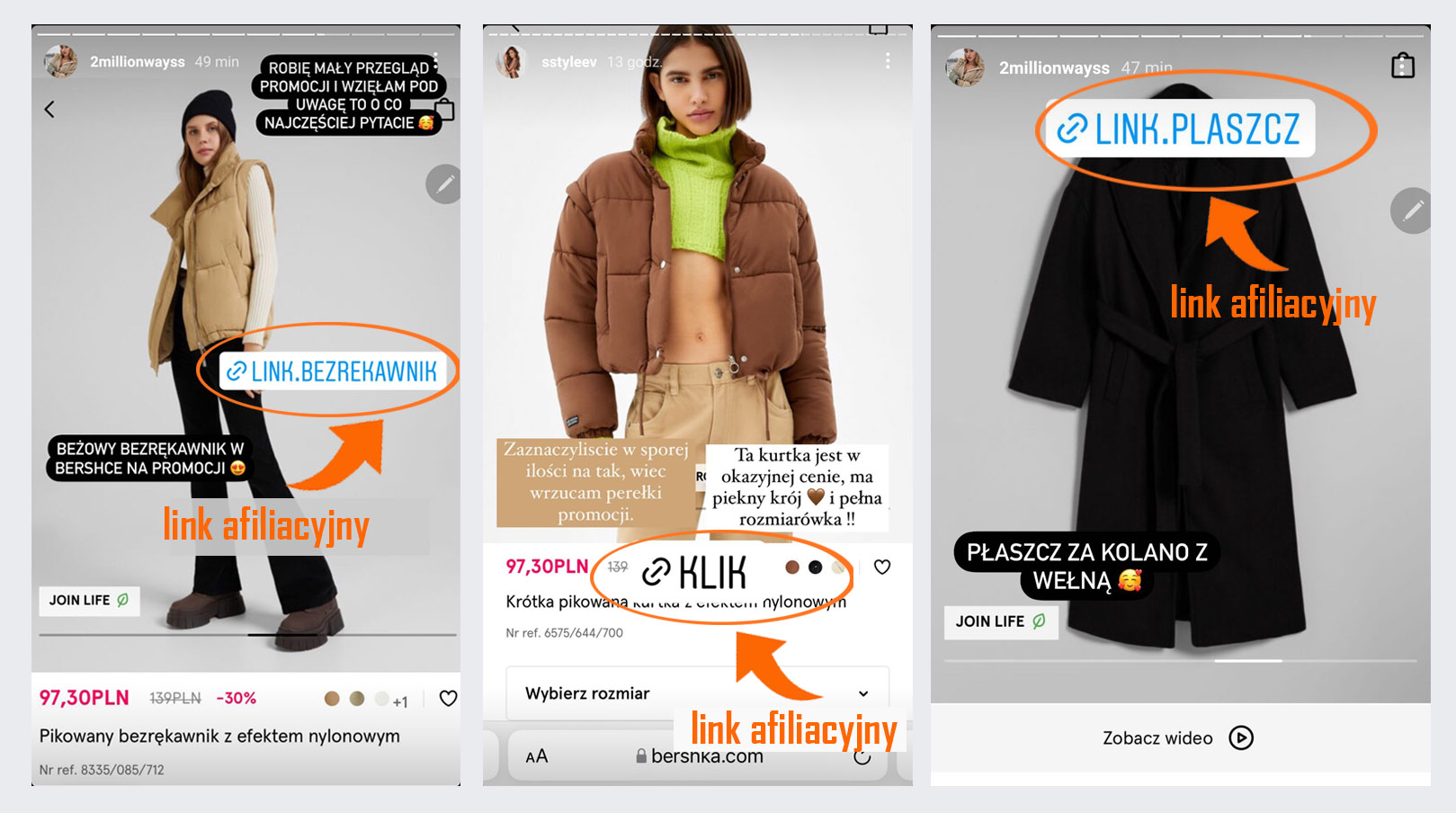
The Link Sticker is an interactive element in Instagram Stories that lets you add an external link directly to a story. When a user taps it, they are redirected to the specified page.
You add an affiliate link to a Link Sticker in exactly the same way as any other link you want the sticker to connect to. Anyone who views the story can tap the sticker to go to the destination. The affiliate link will take the user directly to the recommended store and will count a commission if the user buys something in that store within 30 days.
Become a publisher to earn from Instagram Stories
To start earning on Instagram with affiliate links, you don’t need any additional skills. It’s a very simple and intuitive method. Just complete the registration process in an affiliate network, add a link to your Instagram profile in your account details, and you can start right away!

Earning with Instagram Stories — which formats drive the most engagement in Stories?
On Instagram Stories you can use a wide variety of formats that let you present content in a creative and enganging way. Which format engages a given audience the most depends on many factors, so it’s worth testing and changing the form of your posts. Instagram users like variety, appreciate refined aesthetics, and hate boredom.
Basic visual formats in Instagram Stories
-
Photos: a single shot or a series of photos, which you can enhance with filters, stickers, or text.
-
Video: short clips (max. 15 s), recorded “live” or in hands-free mode — perfect for quick event updates or tutorials.
-
Boomerang: a loop of a few frames that plays forward and backward — a great way to emphasize movement (e.g., a dress twirl or a water splash).
-
Superzoom: automatic zoom-in on an object with added sound and visual effects that increase the drama of the shot.
-
Rewind: plays the recording from end to beginning — surprises and intrigues viewers, especially with visual effects.
-
Layout: a grid made of multiple photos in one view (2×2, 3×3, etc.), helpful for comparisons or showcasing different product variants.
Instagram Stories — photos and videos are the foundation of Stories
To add a photo to an Instagram Story, simply open the app and, from the main view, swipe right or tap the “+” icon in the top-left corner, then choose “Story.” The camera view will appear, where you can take a new photo — select the front or rear camera, set focus by tapping, and press the shutter to capture the moment.
If you want to use a photo that’s already saved on your phone, swipe up on the camera screen to open your gallery. You’ll see thumbnails of your most recent photos — tap the one you want to load it into the Story editor.
For video, if you’re adding a previously recorded clip, just swipe up to open the gallery and tap the selected video — Instagram will automatically trim it to the appropriate length.
If you want to record a Story in real time, choose “Story” mode. Instead of tapping once, press and hold the shutter button to record a clip — Instagram records up to 15 seconds of continuous footage. If you need a longer video, you can split the recording into consecutive segments by releasing and pressing and holding the button again.

Once your photo or video appears in the Story editor, Instagram lets you give it a unique style. By swiping left or right over the photo, you can apply different filters to change the tone and mood. Tapping the sticker icon opens a wide selection of elements: animated GIFs, locations, polls, countdowns, the Link Sticker, and product tags. You can also add text by tapping “Aa” — drag and resize it to fit the frame perfectly. The brush tool lets you draw by hand and choose line thickness and color.
Finally, just before publishing, it’s worth checking your Story settings by tapping the gear icon. There you can choose whether your content should be visible to everyone, only to your Close Friends group, or hidden from a selected group of people. Tapping “Your Story” will publish the finished content, which will remain active for 24 hours. If you want it to be available longer, tap the thumbnail of the published Story on your profile, choose “Highlight,” and give it a name and cover — this way your Story will be saved permanently.
Learn strategies for making money on different platforms, including:
Instagram Stories — add variety using GIFs and Boomerangs
We love GIFs — there’s no doubt about that. We use them at every possible opportunity. Some of them, like memes, have become elements of pop culture. We won’t go into why we’re so fond of animated movie snippets here. In any case, adding moving images to Insta Stories has become hugely popular, and that popularity doesn’t seem to be fading. GIFs are a form of fun, casual communication — and in Stories we rarely tackle serious topics anyway! 😉
This is probably the most popular and most frequently used feature that appeared already in the first update. It involves creating a short, looping video. Until recently, making this kind of content required special apps, but once the option appeared in Stories, Instagram users fell in love with it! A Boomerang can replace longer videos, GIFs, or animations. It’s easy to make and requires virtually no effort… other than a good idea!

Instagram Stories — engage your audience with Rewind and Superzoom
Superzoom is a special camera mode in Instagram Stories that automatically performs a fast, dynamic zoom-in on a selected object, along with a dramatic sound and visual effect. When you switch the Story Camera to “Superzoom” (the magnifying glass icon), the app detects the center of the frame and, over a few seconds, zooms in closer and closer — accompanied by a rising dramatic sound, often compared to movie scenes where the camera zooms in on a character’s face.
In practice, Superzoom works great when you want to draw attention to a detail: an emotional reaction to a gift, a “wow” effect when trying new makeup, or a funny exaggeration of a gesture — for example, zooming in on a facial expression in reaction to something surprising. Unlike a regular zoom, Superzoom is built into Instagram and optimizes the speed and smoothness of the shot, so you don’t have to manually pinch-zoom with your fingers.
To use it, simply swipe along the camera modes bar at the bottom in Stories until you reach the “Superzoom” icon, point your phone at what you want to highlight, and then press the shutter — the recording lasts a pre-set few seconds. After the clip is recorded, you can add stickers, text, or music, and then publish it as part of your Story.
Thanks to the combination of visual and sound effects, Superzoom is great for building suspense and engaging viewers — it’s an excellent way to highlight the most important moments of the day or to amplify a humorous message.
Instagram Stories — engage with questions and polls
Another hit that Instagram users love. With this option, you can easily check what your followers think about a new hairstyle, a movie you’re currently watching, or whether they like the new clothes you’ve bought. You can run a poll on Instagram Stories in two ways: using a slider bar (where you set the level of interest with a swipe — remember to choose the right emoji) or a classic question with two answer options.
With the “Ask a question” option, you can stay in constant touch with your followers, learn what interests them, and above all make it easier for them to contact you. Using questions also helps bring a breath of fresh air into your everyday communication.
Highlights on Instagram Stories
A Story lasts 24 hours, but often we’d like it to stay with us longer. That’s why, for some time now, you can save the Stories you care about most in a Highlights section above the photo grid on your profile. They will display for as long as you want — they disappear only when you remove them yourself. You can create themed highlight collections containing different Stories. This is a great option especially for people who cover many topics. With different types of Stories, you can create your own video “business card.” It’s worth giving highlight collections appealing names and setting icons that encourage people to click.
Instagram Stories — the best format for paid Instagram campaigns
Stories also work well in paid campaigns. Promoting Instagram Stories is often cheaper than promoting a regular post published on your profile. Preparing such an ad is also simple — you just need a graphic in the right size (1080×1920 px) and basic knowledge of Facebook’s Ads Manager. Since Facebook acquired Instagram, promoting content has become much easier. With one tool, you can easily manage campaigns on both platforms.
When it comes to paid content, remember that budget isn’t everything. If you’re not promoting attractive content, it’s easy to waste your spend. That’s why, before you invest money in an ad, it’s worth thinking more than once about whether the content you want to promote has a chance to generate positive reactions from your Instagram fans.
Why it’s worth publishing Instagram Stories
GREATER TRUST: Instagram Stories are a great tool for showing your life or your brand “behind the scenes” — sharing light, enjoyable content that makes fans trust you more and stay with you longer.
THE SURPRISE EFFECT: Thanks to Instagram Stories features, you don’t have to serve followers only static content — you can record videos, entertain them with GIFs, Boomerangs, or stickers!
CONSTANT CONTACT WITH YOUR AUDIENCE: Preparing an attractive photo post for Instagram can be time-consuming. So if you don’t want to lose touch with your followers, it’s worth sharing Stories as often as possible — they require much less effort.
CLOSER RELATIONSHIPS: Thanks to features like polls and questions, you can continuously track what users expect. Stories make everyday contact much easier and help build lasting relationships, which are the foundation of social media presence.
Instagram offers a lot of possibilities, so don’t limit yourself only to traditional photo posts. Instagram Stories are a simple — and above all, user-loved — feature. Using them actively will definitely bring excellent results!
Instagram Stories — a short history of the phenomenon
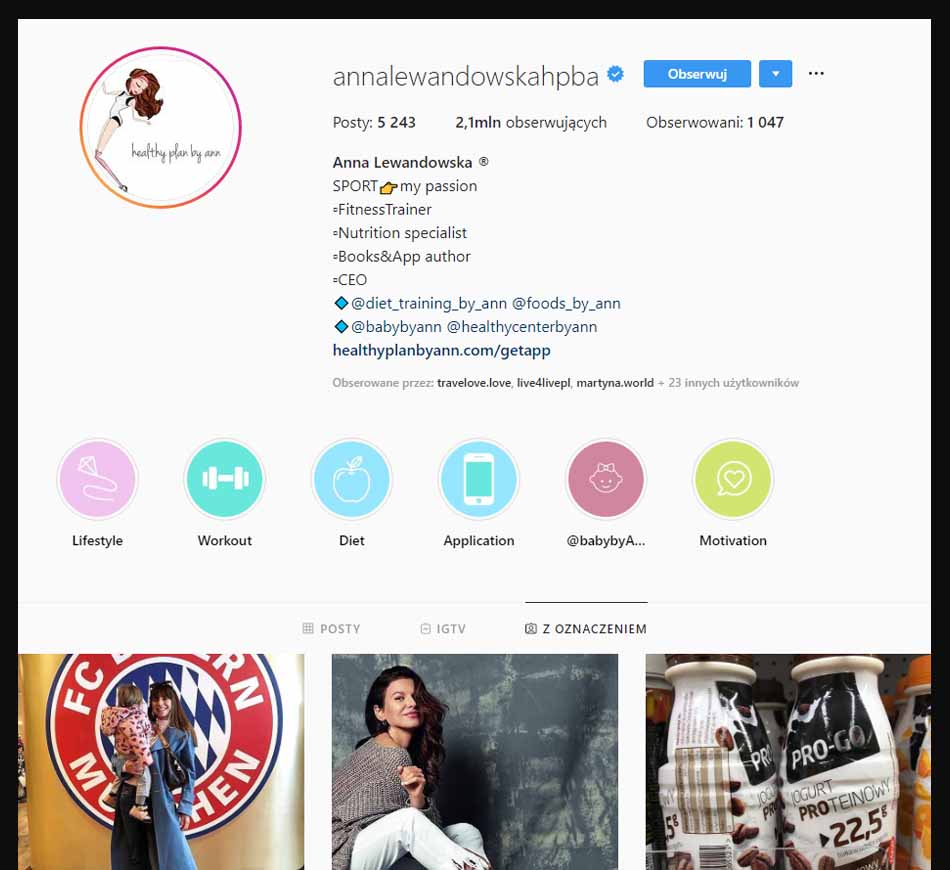
The Insta Stories feature appeared on Instagram in mid-2016 and… was received very poorly! Many users accused Instagram of copying Snapchat. In this case, however, first impressions weren’t the most important. People needed time to get used to the new possibilities, and once the most famous influencers started using Stories, the feature immediately gained approval and huge popularity. Polish bloggers and celebrities also embraced it. Anna Lewandowska’s Instagram is followed by over 2.5 million users. Of course, that’s not only thanks to Instagram Stories, but Stories certainly allow users to see not only her workouts, but also her life “behind the scenes,” which makes them like her even more. It’s estimated that more than 400 million people worldwide currently use Stories! Poland is keeping up with global trends as well, with around 8.5 million users of this medium. If not everyone is tapping through Stories yet, they probably will soon 🙂
By copying Snapchat, Insta Stories very quickly led to a decline in Snapchat’s user numbers. From 2017 onward, Snapchat’s value has been steadily decreasing, as has the number of users leaving for Instagram. A simple usability principle applied: most people preferred having two apps in one, and Stories made that possible. Snapchat simply stopped being necessary. On average, users didn’t really care that one app was borrowing ideas from another. Snapchat’s key demographic — people aged 18 to 34 — left without hesitation after a memorable tweet by Kylie Jenner, an American celebrity, who in February 2018 wrote: “does anyone else not open Snapchat anymore? Or is it just me… ugh this is so sad.” As a result, Instagram now has one billion users, while Snap has fewer and fewer.